Use Chrome Inside a Devcontainer with Claude Code
claude --chrome doesn't work in devcontainers. Chrome Bridge tunnels browser access into your container.
How to fix “claude –chrome” not working in devcontainers
When you run claude --chrome inside a VS Code devcontainer, nothing happens. Chrome runs on the host machine, and its native messaging protocol can’t cross the Docker container boundary. The Chrome DevTools Protocol connection that Claude Code relies on simply doesn’t exist inside the container.
You’re forced to choose: use a devcontainer and lose browser access, or work on the host and lose isolation. Neither is acceptable for teams that need both. Chrome Bridge fixes this by tunneling the Chrome DevTools Protocol connection from inside the container to Chrome on the host.
How it works
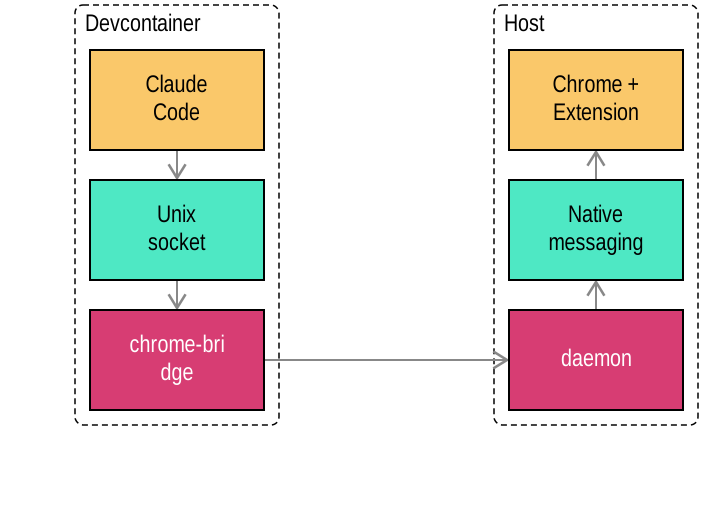
Chrome Bridge creates a Unix socket at the exact path Claude Code expects. When Claude connects, traffic is tunneled over TCP to the daemon running on the host, which relays it to Chrome via the Chrome DevTools Protocol. From Claude Code’s perspective, Chrome is local — the MCP browser bridge is completely transparent.
Run Chrome from inside a devcontainer
Chrome Bridge tunnels Chrome’s native messaging protocol from the host into the devcontainer over TCP. One command on the host, one command in the container, and claude --chrome works exactly like it does on your local machine.
# On the host
human daemon start

# In the devcontainer
human chrome-bridge
That’s it. Claude Code connects to Chrome through the bridge transparently — no configuration changes, no workarounds. Browser automation, headless Chrome, and every claude --chrome feature work inside the container.
Use cases
Visual regression testing in devcontainers
Claude can open pages in a real browser, take screenshots, and compare them against baselines — all from inside the devcontainer where your test suite runs. Visual testing that previously required host access now works in isolated Docker containers.
UI development with browser preview in containers
Let Claude see what it’s building. With browser access inside the devcontainer, it can render components, check layouts, and iterate on visual changes without you having to screenshot and paste.
OAuth and MCP authentication from devcontainers
OAuth flows that require a browser redirect work through the bridge. Claude can authenticate with external services that use browser-based OAuth, enabling MCP servers that need user consent — all from within the container.
Web scraping with Chrome in Docker
Claude can fetch and interact with web pages using a full browser engine inside the container — handling JavaScript-rendered content, SPAs, and authenticated sessions that simple HTTP requests can’t reach. Headless Chrome runs on the host while Claude Code drives it from the devcontainer.
Chrome DevTools Protocol inside Docker containers
Chrome Bridge speaks the same Chrome DevTools Protocol (CDP) that Claude Code, Puppeteer, Playwright, and every browser-automation tool uses. The difference is that the CDP endpoint is served over a Unix socket inside the container, while the actual Chrome process runs on the host. The daemon relays WebSocket frames in both directions with zero decoding — whatever Claude sends to Chrome and whatever Chrome sends back flows through transparently.
Why it matters
Devcontainers are the right way to run Claude Code in teams. They provide reproducibility, isolation, and security. But without browser access, you’re giving up a significant chunk of Claude’s capabilities.
Chrome Bridge means you don’t have to choose. Your team gets the isolation of devcontainers and the full power of claude --chrome.
Related features
Chrome Bridge pairs naturally with the rest of the human devcontainer stack:
- MCP OAuth in devcontainers — OAuth flows that need a browser redirect work through the bridge, enabling MCP servers that require user consent.
- HTTPS proxy and firewall — Control which domains Chrome Bridge can reach from inside the container.
- Open URLs from devcontainers — Open documentation and preview URLs on the host browser from inside the container.