human is an open-source CLI that runs Claude Code inside a secure devcontainer, wired into your tracker, docs, designs, and analytics.
One command takes a ticket from idea to shipped code. You review the outcome, not every diff.
curl -sSfL gethuman.sh/install.sh | bash
human init
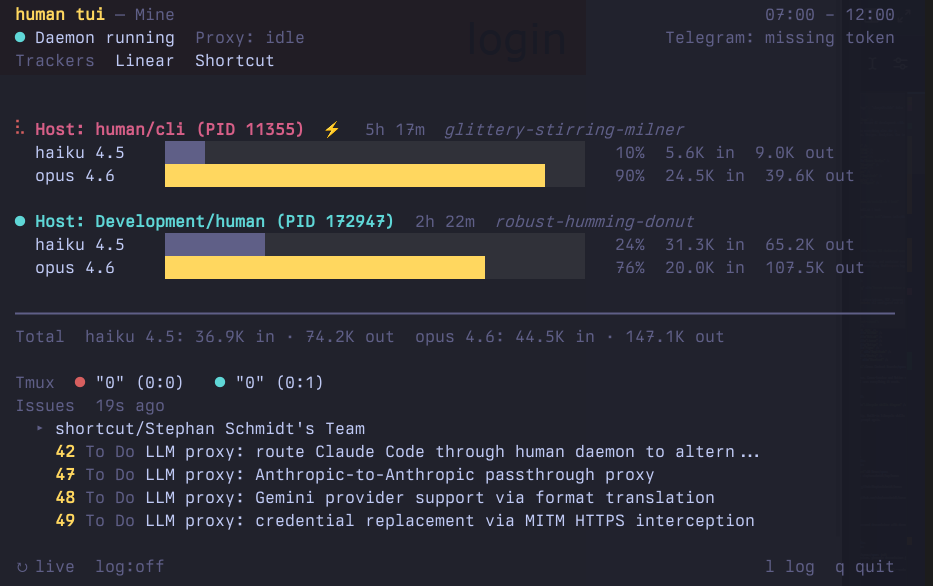
The Control Room
Monitor running agents, token usage, tracker issues, and
pipeline state in real time. One view for everything.
The Fence
Just works. OAuth, Claude subscriptions, MCP, browser access,
Chrome Bridge, firewall — all configured out of the box.
Intent In
Cross Context Search
Connectors for every source. Cross-tracker and Notion search,
local fast index. Your AI sees everything it needs.
Outcome Review
Ideate, plan, execute, review. One command runs the full
pipeline from rough idea to shipped code.
What is a dark software factory?
In manufacturing, a dark factory runs with the lights off — the
machines don’t need them. In software, it’s the same idea:
AI agents write the code, test it against scenarios they’ve never
seen, and ship it. No one reviews diffs line by line.
But the lights aren’t off everywhere. Someone still has to define
what to build, feed the factory real context, set the policies, and
decide when an outcome is good enough. That work stays human.
That’s what human is. It’s the part of the dark factory
where people belong:
Intent in. Tickets, docs, designs, analytics —
the real context Claude needs to build the right thing, not just any
thing.
Policy around the line. Secure devcontainer,
credential isolation, outbound allowlists, full audit trail. The
factory runs, but only inside the fence you drew.
Review on outcomes, not diffs. Skills for ideation,
planning, execution, and review. You approve what shipped, not every
line that led there.
Claude runs the line. You stay on intent. The factory handles the rest.
One command sets up a fully secured devcontainer with daemon, Chrome proxy, firewall, and Claude Code integration.
human init
# Configure services, generate devcontainer.json, install Claude Code skillshuman daemon start
devcontainer up --workspace-folder .
How human works with Claude Code
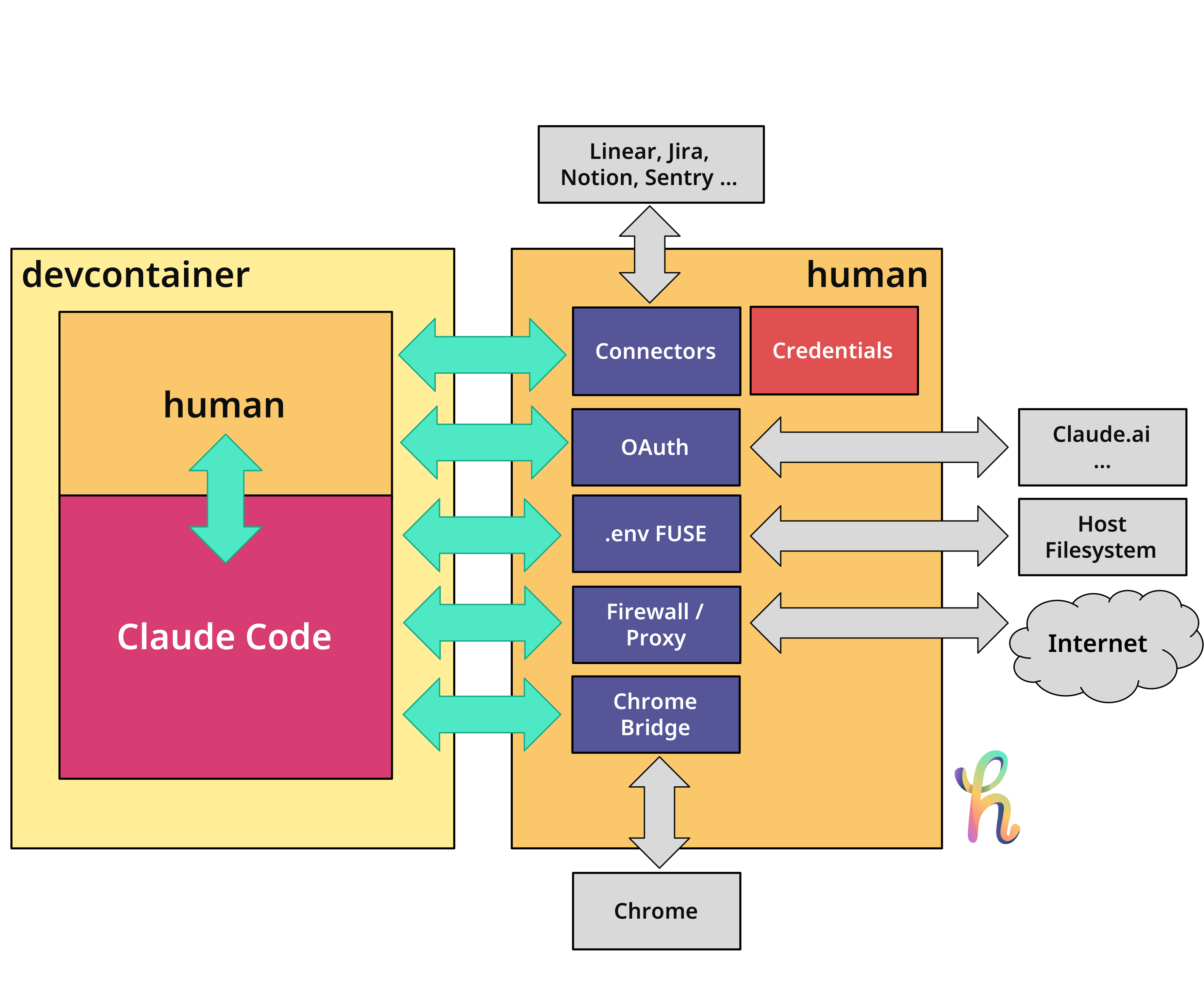
human can be used as a standalone CLI with any Coding agent to easily
connect to Jira, Linear, Github and other data sources. It is much more
powerful when used with a devcontainer, where it connects to an outside
human server (same binary) to connect to those data sources, act as a
firewall/proxy and lets Claude Code connect to Chrome from inside the
container.
Built-in Claude Code skills for
the full lifecycle: /human-ready, /human-plan, /human-execute,
/human-review, /human-bug-plan, /human-findbugs, /human-security.
Token Optimization
95% fewer Claude Code tokens vs raw APIs and MCP servers —
stay under your daily limit.
Title: Implement SSO
Status: To Do
AC:
- Works with SAML
- Login redirect ok
- Error handling
human CLI usage examples
# List issues (JSON by default)human jira issues list --project=KAN# Jirahuman github issues list --project=octocat/hello-world# GitHubhuman gitlab issues list --project=mygroup/myproject# GitLabhuman linear issues list --project=ENG# Linearhuman azuredevops issues list --project=Human# Azure DevOpshuman shortcut issues list --project=MyProject# Shortcuthuman clickup issues list --project=901234567# ClickUp# Get a single issue as markdownhuman jira issue get KAN-1# Create an issuehuman linear issue create --project=ENG"Implement feature"# Add a commenthuman jira issue comment add KAN-1"This is done"# Notion — search workspace, read pageshuman notion search "quarterly report"human notion page get <page-id># Figma — browse files, inspect designshuman figma file get <file-key>human figma file comments <file-key>human figma file components <file-key># Amplitude — product analyticshuman amplitude events list
human amplitude cohorts list
# Sentry — error trackinghuman sentry issues list --project=your-projecthuman sentry issue get 12345
Claude Code skills for the full development lifecycle
AI writes code. But who decides what gets built? human’s
built-in skills cover the full lifecycle — from challenging the
idea through planning, execution, review, and verification.
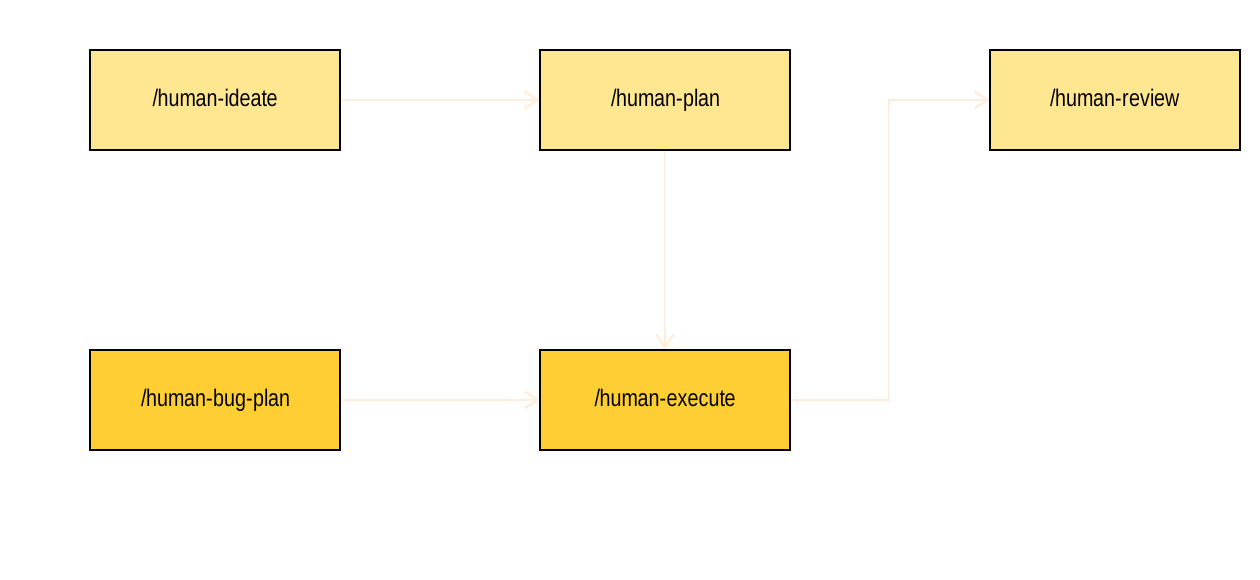
One command (/human-sprint) runs the entire pipeline.
# Included in human init, or run separately:human install --agentclaude
/human-ideate
Challenges your idea with forcing questions, refines the scope,
and creates a ready PM ticket in your chosen tracker. The creation
process ensures quality — no separate readiness check needed.
/human-sprint
One command from rough idea to shipped code. Chains ideate, plan,
execute, and review. Auto-decides mechanical questions, surfaces
only genuine taste decisions.
/human-plan
Fetches a ticket, explores the codebase, and produces a structured
implementation plan saved to .human/plans/.
/human-execute
Loads a plan from .human/plans/, executes it step by
step, then runs a review checkpoint to verify the result.
/human-review
Reviews the current branch’s changes against the
ticket’s acceptance criteria. Flags gaps, scope creep, and
missing edge cases. Saved to .human/reviews/.
/human-bug-plan
Analyzes a bug ticket for root cause, traces affected code, and
produces a fix plan saved to .human/bugs/.
/human-findbugs
Scans the codebase for bugs using a multi-agent pipeline. No ticket
needed. Finds logic errors, error handling gaps, race conditions,
and security vulnerabilities. Report saved to
.human/bugs/.
/human-security
Deep security audit with attack chain analysis. Maps the attack
surface, scans for injection, auth, secrets, dependency, and infra
vulnerabilities, then chains findings into exploitable paths. Report
saved to .human/security/.
Run Claude Code in a devcontainer
Works everywhere you code.
AI agents inside devcontainers need access to issue trackers, Notion,
Figma, Amplitude, and Sentry — but credentials should stay on the
host.
Host
human tui
# Starts daemon, shows dashboard with issues and pipeline state
Container
# All commands work transparentlyhuman jira issues list --project=KANhuman notion search "quarterly report"human figma file get ABC123
Set HUMAN_DAEMON_ADDR and
HUMAN_DAEMON_TOKEN in your
devcontainer.json — all commands are forwarded to the
host daemon. Token-based auth keeps it secure.
HTTPS Proxy — control what AI agents can reach
The daemon includes a transparent HTTPS proxy that filters outbound
traffic by domain using SNI inspection — no certificates, no
decryption. Configure an allowlist or blocklist in
.humanconfig.yaml to control which external services
containers can access.
Want a ready-to-use devcontainer with human, proxy, and Chrome Bridge
pre-configured? See
treehouse.
Chrome Bridge — browse from inside the container
claude --chrome doesn’t work in containers because
Chrome runs on the host. The Chrome Bridge tunnels the connection so
your AI agent can browse, inspect, and screenshot — transparently.
Container
human chrome-bridge
# Claude Code can now use --chrome inside the container
Claude Code for teams
human init — one command, every tool configured. No
per-developer setup. No “it works on my machine.”
Credentials stay on the machine — the AI never sees API tokens
or passwords
Skills enforce the same workflow for every developer — same
flow, same results
Definition of Ready enforces ticket quality before coding starts
Full audit trail — every agent action is logged, ready for SOC
2 and compliance
AI
human jira issue get KAN-42
AI
human linear issues list
--project=ENG
AI
human jira issue comment add KAN-42
"Done"
Why not just use MCP servers?
You can. It’s like building a web app with raw Go libraries in
2004. Or you could use the framework.
1 Our measurement with ttok (Jira API vs
human JSON, 3 small tickets) shows 95% savings (bigger
tickets the overhead is less).
Frequently asked questions
What is a dark software factory?
A dark software factory is an autonomous software delivery pipeline
where AI agents write, test, and ship code from specifications, the
way a lights-out manufacturing plant runs with no workers on the
floor. Humans stay on intent, policy, and outcome review. The term
was popularized by Dan Shapiro and has been adopted by BCG Platinion
and i-SCOOP as the category label for Level 5 AI-assisted coding.
Read the full explainer →
How is human different from MCP servers?
MCP servers dump raw API responses into your Claude Code context
window, burning tokens. human is a CLI that extracts signal and
discards noise — our measurement shows up to 95% fewer tokens
than raw API or MCP responses. One install covers Jira, GitHub,
GitLab, Linear, Azure DevOps, Shortcut, ClickUp, Notion, Figma,
Amplitude, Sentry, and Telegram. One credential system. Works in
devcontainers.
Does human work with Claude Code in devcontainers?
Yes. human runs in daemon mode on the host and forwards commands
from inside the container transparently. Credentials stay on the
host, the AI never sees them. The Chrome Bridge tunnels
claude --chrome into the container so your agent can
browse and screenshot. MCP OAuth flows are proxied to the host
browser — no port forwarding hacks, no workarounds.
Which issue trackers does human support?
Jira (Cloud and Server), GitHub Issues and Projects, GitLab Issues,
Linear, Azure DevOps Boards, Shortcut, and ClickUp. Same commands
across all of them, so skills and scripts work regardless of which
tracker your team picks. Notion and ClickUp Docs are supported for
docs and wikis.
How do I install human?
One line: curl -sSfL gethuman.sh/install.sh | bash,
then human init to configure your connectors and
generate a devcontainer. Also available via Homebrew
(brew install stephanschmidt/tap/human), mise, and
go install.
Does human store my API credentials in the AI context?
No. Credentials are stored on your host machine and used by the CLI
process. The AI agent never sees tokens, passwords, or OAuth
secrets. Inside devcontainers, human uses a daemon-and-token model
so the container gets an ephemeral auth token but the real
credentials never cross the container boundary. Full audit trail is
available for SOC 2 and compliance.
Is human open source?
Yes. The source is on
GitHub
and the CLI is free to install and use.